Branded Ticket Storefronts. Or Conference Registration with Badges.
Eventcube runs branded ticket storefronts, with memberships, subscriptions and season passes built in. eventcloud is registration built for conferences: a form per ticket group, badges, a self-service Badge Kiosk and check-in on any phone, with tickets never counted. Competitor facts checked 26 June 2026 against Eventcube's published pricing and fees.
Both put your brand front and centre. Eventcube funds its storefront with a share of every sale; eventcloud counts team seats and builds conference badging and check-in in.
eventcloud
Conferences
Where It Shines
Unlimited events, registrations and attendees; we take 0% of your ticket revenue
A different registration form for each ticket group
Badges designed in real millimetres, printed from the dashboard or at a self-service Badge Kiosk
Your brand on every event page, at your own eventcloud address
Session booking at sign-up, with a capacity for each session
A share of every sale: 5% on the free Starter plan, or 3% on Pro at about $99 a month
Eventcube branding removed only on Pro and above
No native badge printing
Restated from the comparison table below, as checked on 26 June 2026 against Eventcube's published pricing and fees.
Side by Side
Eight Rows, Side by Side.
Eventcube charges a 3% to 5% platform fee depending on plan, often passed to buyers via a default booking fee.
eventcloud
Eventcube
Pricing Model
eventcloud
Per team seat; tickets are never counted
Eventcube
Free (5% fee) or Pro ~$99/mo (3% fee)
Transaction Fees (stronger: eventcloud)
eventcloud
None: we take 0% of your ticket revenue
Eventcube
5% (Starter) or 3% (Pro) of every sale
Your Payout
eventcloud
Your own Stripe account, on your own payout schedule
Eventcube
Your own Stripe, paid directly
White-label & Domain
eventcloud
Your brand on every event page. Every organisation gets its own yourname.eventcloud.io address, on every plan, including during the trial. Your own domain is an Enterprise arrangement.
Eventcube
Custom domain on all plans; branding removal on Pro+
Badges (stronger: eventcloud)
eventcloud
Badge designer; print from the dashboard, or at a self-service badge kiosk as people arrive
Eventcube
No native badge printing
Check-in
eventcloud
QR check-in on any phone
Eventcube
QR ticket scanning included
Memberships
eventcloud
Member rates run through a private ticket group with its own prices and form, open only to people with the link. Coming soon: member verification and member pricing. Need them? Tell us.
Eventcube
Memberships, subscriptions, season passes
Registration Forms (stronger: eventcloud)
eventcloud
A different registration form per ticket group
Eventcube
Custom checkout fields
Card processing (Stripe) applies on both sides. Eventcube’s default 10% booking fee can pass platform and processing costs to buyers.
What Gets Counted
A Cut of Every Sale There. Seats Here.
A 1,000-ticket event at $100 a ticket.
eventcloud Counts
Team seats
Events, registrations and attendees are never counted, and we take 0% of your ticket revenue.
Eventcube Counts
A share of every sale
Eventcube’s 3% Pro fee on $100,000, $3,000 in platform fees (5% on the free plan is $5,000), plus the Pro subscription.
Eventcube lets you pass fees to buyers via a booking fee, so attendees often absorb them. Card processing (Stripe) applies on both sides. A percentage scales with success; a seat count does not.
Registration Forms
A Form for Every Ticket Group.
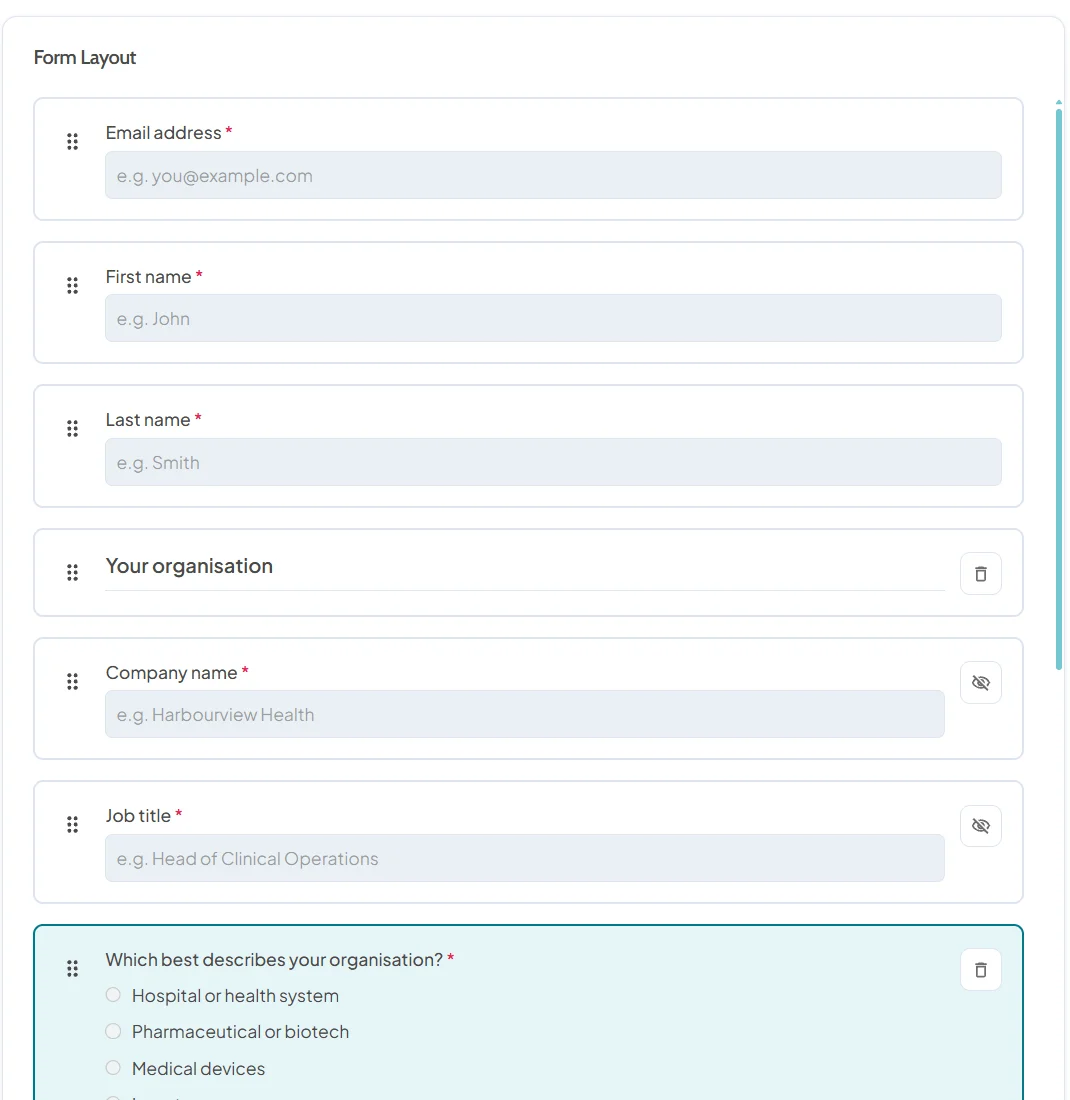
Eventcube adds custom fields to its checkout. eventcloud gives every ticket group its own registration form, so exhibitors, speakers and visitors each answer the questions that matter for them, and the answers flow onto their badges.
The usual question types: text, choices, dropdowns, dates, countries, phone numbers and addresses
One form per ticket group: speakers, exhibitors and visitors each see their own
Answers go everywhere: badges, the attendee list and the Excel export
In five languages: form labels follow the language each attendee registers in
Fair Questions
Eventcube vs eventcloud, Answered.
Both put my brand first. What is the difference?
Eventcube runs white-label storefronts, with a custom domain on all plans, funds them with a 3% to 5% transaction fee and leans into memberships. eventcloud puts your brand on every event page, takes 0% of your ticket revenue and adds conference badging and check-in. Every organisation gets its own yourname.eventcloud.io address, on every plan, including during the trial, and running the product on your own domain is an Enterprise arrangement.
Does Eventcube print event badges?
Not natively: Eventcube is a ticketing and storefront platform without its own badge designer or badge printing. eventcloud includes a badge designer, printing from the dashboard or a self-service kiosk as people arrive, and QR check-in. If you need conference badging, that is a real difference.
Is eventcloud a good fit for conferences?
Yes, conferences are what it is built for. Each delegate type gets its own registration form, price schedule and confirmation email, delegates book their sessions as they register, badges are designed in real millimetres and printed from the dashboard or at a self-service kiosk, and door staff check people in from any phone or tablet. See how it works for conferences.
Does Eventcube hold my money?
No, funds land in your own connected Stripe account, like eventcloud. Neither platform holds your ticket revenue until after the event.
How do Eventcube's fees compare?
For paid sales at volume, Eventcube's 3% to 5% scales with every ticket, while eventcloud takes 0% of your ticket revenue and counts team seats instead. Eventcube can pass its fee to buyers, so your attendees may absorb it; the trade-off is a higher price for them. Run your numbers both ways.
RSVPs, invitations and guest lists, metered by registrations a month. We count team seats instead.
→
Registration, Badges and Check-in
Your Brand First. Badges and Check-in Included.
Set up the passes, forms, badges and check-in link in the free trial, rehearse checkout with Stripe test cards, and subscribe when you are ready to go live.
We've received your message now and one of our colleagues will reply to your message as soon as they see it. We try to reply immediately, but sometimes, we gotta get the kids from school or get some food or some trivial every day task.