Registration, Badges and a Door Anyone Can Staff. No Flight Case Required.
Accelevents' Standard onsite kit comes with two iPads, two printers and a 5G router. Ours is a link, a four-digit PIN and whatever phone your volunteer brought, and badges print at a self-service kiosk built from a laptop and the printer beside it. No kit to rent, no flight case to check in. Competitor facts checked 27 October 2026. Sources and dates are listed below.
Conditional Logic and Approvals (stronger: Accelevents)
eventcloudComing Soon
Show or hide questions based on earlier answers, and approve each registration before it is confirmed. Need either for your event? Tell us.
AcceleventsYes
Conditional logic, approval workflows and progressive forms.S1
Checked
Session AccessTie
eventcloudYes
Free or paid sessions booked at sign-up, each with its own capacity, and a scan at each session's door admits or refuses. You choose which ticket types can book or include each one.
Invoice and Offline Payments (stronger: Accelevents)
eventcloudComing Soon
Delegates pay by invoice, bank transfer or purchase order. Card payments settle in your own Stripe account, and a payment link holds a seat. Need invoices? Let us know.
A Badge Kiosk on a laptop with the printer beside it: visitors type their ticket number, check the badge and print it, and printing checks them in.
AcceleventsYes
At a self-service kiosk or a staffed desk, straight to Zebra printers, on every plan. S2S3
Checked
Door Staff DevicesDepends
eventcloudYes
Any phone or tablet, in the browser, with one link and a 4-digit PIN. No app, no staff accounts.
AcceleventsYes
Its Admin App on iPads or phones, with a kiosk mode on the iPad.S8
Checked
Offline Check-in (stronger: Accelevents)
eventcloudComing Soon
Keep scanning when the venue Wi-Fi drops. Patchy signal at your venue? Talk to us.
AcceleventsYes
Check-in carries on without a connection and syncs later, though printing needs one, according to its own badge-printing guide.S8
Checked
Exhibitors
Lead RetrievalTie
eventcloudYes
Exhibitors use their own phones to scan the QR code on each attendee's badge or in their event app, rate and qualify each lead, and export to Excel. No charge from us per scanner or per lead.
AcceleventsYes
Scanning in its attendee app on exhibitors' own phones, with ratings, notes and a CSV download, on every plan. S2S5
Checked
Data
CRM Sync (stronger: Accelevents)
eventcloudComing Soon
Salesforce, HubSpot and Dynamics sync, Zapier, and a data API with webhooks. Excel exports carry every registration answer. Tell us which tools you need connected.
AcceleventsYes
Salesforce, HubSpot and Marketo, plus Zapier, a public API and webhooks.S9
Checked
Admin
Unlimited Events (stronger: eventcloud)
eventcloudYes
On every plan. Events, registrations and attendees are never counted.
AcceleventsPartial
Business tier and above; Professional covers one event.S2
Checked
Admin Seats (stronger: Accelevents)
eventcloud
Team seats are the one thing we count: events, registrations and attendees never touch the bill.
How to read it. Yes, Partial and No describe each platform today; Not confirmed means we could not confirm it from public sources on the date checked, never that it is missing. Coming soon marks what eventcloud is building now, and the row still goes to whoever does it today. Tell us if a fact has changed. Accelevents, Passkey and Zebra are trademarks of their owners, used only to identify the products compared; eventcloud is not affiliated with Accelevents.
What Gets Counted
What Each Platform Meters.
Two different meters. Accelevents sizes its plans by events; eventcloud counts the people on your team.
eventcloud Counts
Team seats
Events, registrations and attendees are never counted.
Accelevents Counts
Events, by plan
Professional covers one event, Business and above unlimited events; admin seats are unlimited on every plan; the pricing page does not state a registrant limit S2.
What unlimited covers here, and the few limits that remain, is written out just below.
Unlimited, with the Small Print Printed Large.
No event count, no attendee count. Here is the whole scope, small print included.
Unlimited events, registrations and attendees on every plan. We count team seats, not tickets, so your bill does not rise because your event sells out. The limits that do exist are operational, not commercial: 99 of one ticket type per order line, 10,000 orders per Excel export, five languages per event, and one subdomain and one sending domain per organisation.
At the Door
The Onsite Kit Question.
Accelevents' onsite kit page lists a Standard kit of two Zebra printers, two iPads, a 5G router and 500 badges, and recommends its kits for events under 1,000 attendees printing in black and white. eventcloud's door is a link and a four-digit PIN on the phones your team already carries, plus a Badge Kiosk on a laptop with the printer beside it.
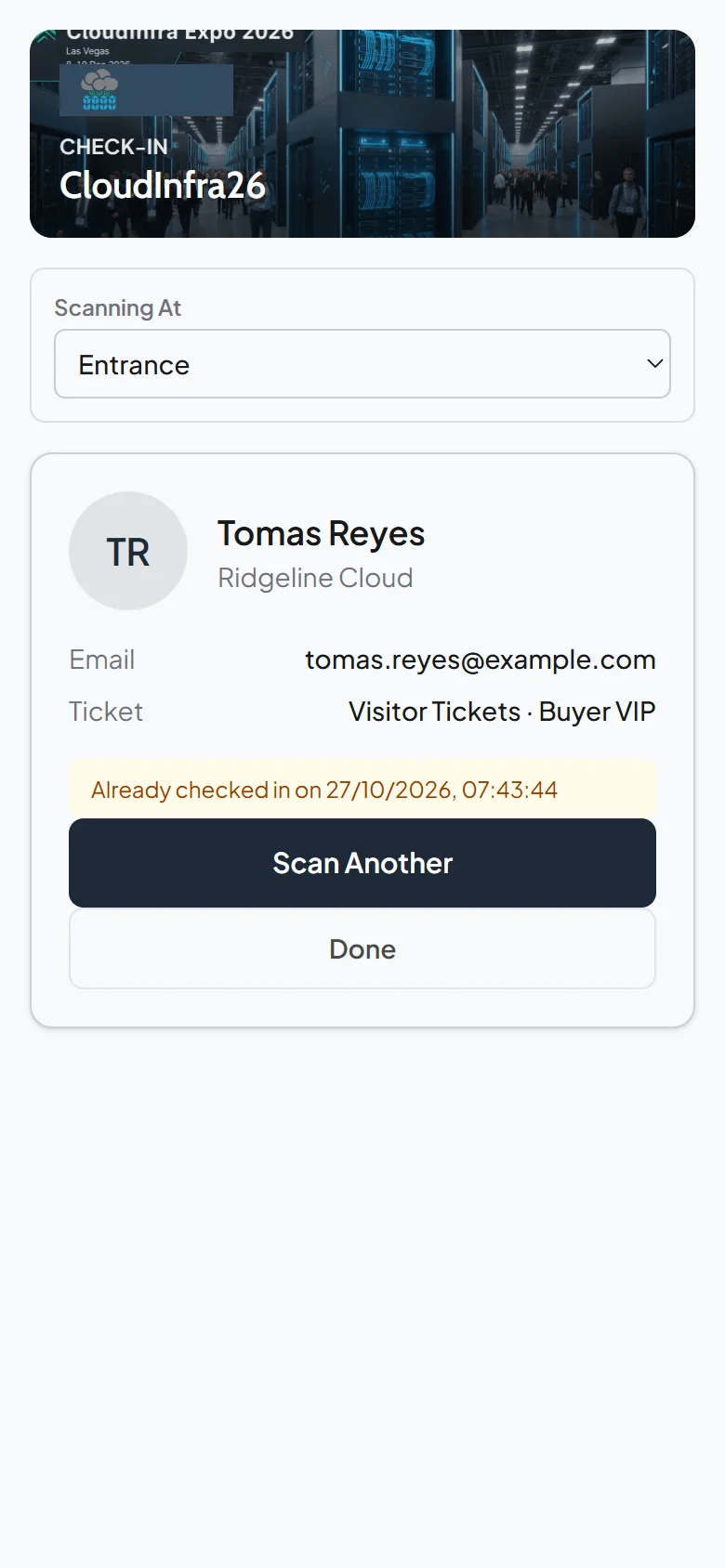
A link and a PIN: door staff open one link on any phone or tablet and enter a 4-digit PIN. No app to install, no staff accounts, and you can pause or rotate the link between shifts.
A kiosk, not a kit: visitors type their ticket number at the Badge Kiosk, check the badge and print it, and printing checks them in. Start Edge or Chrome in kiosk mode on a Windows laptop and badges print with no dialog.
Duplicates caught: a second scan shows when the first one happened, and refunded and unpaid tickets are turned away, as are test tickets once you publish.
Plan the venue Wi-Fi: check-in runs in the browser, so test the signal at every entrance and at the kiosk during build-up, and bring a 4G router where it is weak. Accelevents' own guide says its printing needs a connection too.
Where the Facts Come From
Sources.
Every competitor fact on this page links here, with the date we checked it.
Accelevents publishes starting prices: Professional "Starting From $7,500" for one event and Business "Starting From $13,500" for unlimited events, with Enterprise and White Label priced on request. Its plan table shows lead capture, kiosk check-in and badge printing on every plan and marks the mobile event app as an add-on, with no amount, and its onsite kits are listed from $1,000 (Accelevents pricing and onsite kit pages, checked 27 October 2026). eventcloud's price lives on one page, our pricing page, and what it meters is team seats: never events, registrations, badges or scans.
Can eventcloud print badges at a kiosk like Accelevents?
Yes. Turn a laptop and the printer beside it into a self-service Badge Kiosk: visitors type their ticket number, or find themselves by name or email if you switch that on, check the badge and print it, and printing checks them in. Start Edge or Chrome in kiosk mode on a Windows laptop, with the command on the Badge Kiosk page, and badges print with no dialog. Accelevents also prints at a staffed desk from its admin app. Want printing at a staffed desk too? Tell us how your desk runs.
Does eventcloud have conditional logic or approvals?
Coming soon: show or hide questions based on earlier answers, and approval of each registration before it is confirmed. Need either for your next event? Tell us. Each ticket group has its own form, so each audience is asked only what applies to it; private groups are reachable only by a secret link, and promo codes can be restricted to named email addresses or whole domains.
Can exhibitors scan leads?
Yes. Lead retrieval comes with every seat: exhibitors use their own phones to scan the QR code on each attendee's badge or in their event app, rate and qualify each lead, and export their leads to Excel. No charge from us per scanner or per lead. You decide whether exhibitors get it with their pass or buy it at checkout for a price you set. Accelevents lists lead capture on every plan too, and its integrations route leads to a CRM. Coming soon: CRM sync for eventcloud. Want leads flowing straight into yours? Tell us which CRM you use.
Can we check people in at each session?
Yes. Pick a session on the check-in link and each scan admits or refuses by booking or ticket type, flags re-entry and keeps a running count against capacity on every device at that door. Afterwards, each session's attendee list shows who came in and when, as a spreadsheet.
Can we try eventcloud for free?
Yes. You can build the whole event, rehearse checkout with Stripe test cards and rehearse check-in on a draft event for free; you subscribe when you are ready to publish. Free events get the same ticket PDFs, QR codes and confirmations as paid ones.
We've received your message now and one of our colleagues will reply to your message as soon as they see it. We try to reply immediately, but sometimes, we gotta get the kids from school or get some food or some trivial every day task.